
Smartboard vs Smart TV: Which Display Solution Dominates in 2026?
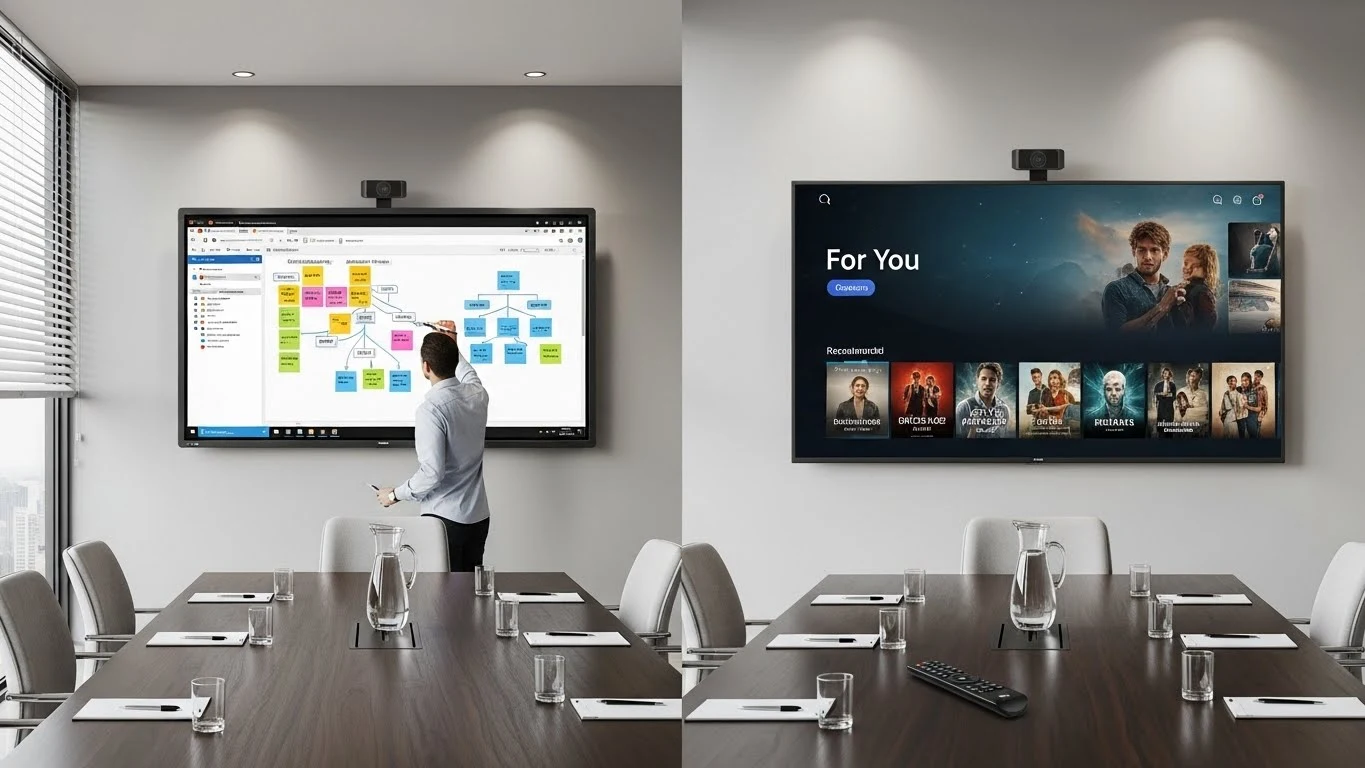
Executive Summary: The debate between Smartboard vs Smart TV technology fundamentally comes down to active collaboration versus passive consumption. While a Smart TV excels at broadcasting high-quality video for entertainment or digital signage, it lacks the multi-touch interactivity, enterprise-grade security, and robust operating systems that define modern Smartboards. For businesses and educational institutions in Malaysia, choosing the wrong display can lead to stagnant meetings and lower engagement.
AI Snapshot: Quick Definition
A Smartboard (Interactive Flat Panel) enables multi-touch interactivity, real-time whiteboarding, and collaborative software use, designed for "lean-forward" active engagement. In contrast, a Smart TV is a "lean-back" device limited to passive media consumption and streaming, lacking the touch capabilities and durability required for professional collaboration.
The Evolution: From Passive Screens to Interactive Hubs
Historically, the boardroom was dominated by the humble projector and later, the consumer-grade television. Early iterations of the "Smart TV" introduced internet connectivity, allowing basic app usage like YouTube or Netflix. However, as corporate and educational needs evolved, the limitations of the Smart TV became apparent—specifically, the inability to interact directly with the content.
The "Smartboard," or Interactive Flat Panel (IFP), emerged to bridge this gap. Unlike the one-way nature of television, Smartboards were engineered to replicate the intuitive experience of a whiteboard but with digital power. According to market research by Mordor Intelligence, the interactive display market is projected to reach over $27 billion by 2029, driven by this shift from passive viewing to active participation.
Core Technology: Smartboard vs Smart TV
To truly understand the Smartboard vs Smart TV comparison, we must look under the hood. The technical architecture of these devices reveals why they serve such distinct purposes.
1. Touch Technology & Latency
A standard Smart TV has no touch capability. It relies entirely on a remote control or casted device. A Smartboard, however, utilizes advanced touch technologies like Infrared (IR) or Projected Capacitive (PCAP) bonding. High-end models from our Smartboard solutions offer up to 20 points of simultaneous touch with near-zero latency, allowing multiple users to write, erase, and manipulate data simultaneously.
2. Operating Systems (OS)
Smart TVs typically run on lightweight consumer OS platforms like WebOS, Tizen, or Android TV. These are optimized for media streaming but block the installation of business apps like Microsoft Teams or Zoom Rooms. Conversely, modern Smartboards are often "System-on-Chip" (SoC) devices running robust Android versions or integrating an OPS (Open Pluggable Specification) slot for a full Windows 11 PC experience. This effectively turns the display into a giant, touch-enabled computer.
Modern Application: Where Does Each Fit?
The decision to deploy a Smartboard vs Smart TV often depends on the room's function.
- The Huddle Room & Classroom: Here, the Smartboard dominates. The ability to annotate directly over a slide deck, save the notes to the cloud, and email them to participants instantly transforms a meeting from a lecture into a workshop.
- The Lobby & Breakroom: This is Smart TV territory. For digital signage, displaying cable news, or running a looped corporate video, the passive nature and lower cost of a Smart TV make it the logical choice.
The Future: AI Integration and 2026 Trends
As we move into 2026, Artificial Intelligence is widening the gap between these technologies. Smart TVs are using AI primarily for image upscaling and content recommendation. However, Smartboards are integrating AI for productivity.
Newer interactive panels feature AI-powered cameras that can track the active speaker (Voice Tracking) and auto-frame participants. Furthermore, AI handwriting recognition converts scribbles into legible text in real-time. A report by The Business Research Company highlights that the integration of AI and gesture-based interaction is a major trend propelling the interactive display market forward.
Comparison Table: Technical Specs
| Feature | Smartboard (Interactive Flat Panel) | Smart TV (Consumer/Commercial) |
|---|---|---|
| Interactivity | Active (20+ Touch Points, Pen, Finger) | Passive (Remote Control only) |
| Glass Hardness | 7H-9H Tempered (Impact Resistant) | Standard Soft Panel (Fragile) |
| Operating Hours | 16/7 or 24/7 Commercial Rating | 6-8 Hours/Day (Consumer Grade) |
| Software | Whiteboarding, Wireless Casting (2-way), Zoom/Teams | Streaming Apps (Netflix, YouTube) |
| Connectivity | HDMI, USB-C (65W charging), USB Touch, OPS | HDMI, Optical Audio |
| Cost | Higher Initial Investment (High ROI) | Lower Initial Cost (Low ROI for Business) |
Frequently Asked Questions
Can I turn a regular Smart TV into a Smartboard?
Technically, yes, by adding a touch overlay frame. However, this is often a clumsy solution. Overlays collect dust, suffer from "ghost touches," and lack the integrated software ecosystem that makes a true Smartboard effective for business. It is generally better to invest in a purpose-built interactive display.
Is a Smartboard more expensive than a Smart TV?
Yes, the upfront cost of a Smartboard is higher due to the touch technology, toughened glass, and onboard computing. However, when you factor in the lifespan (50,000 hours vs 20,000 hours) and the elimination of needing a separate PC or projector, the Smartboard often offers better long-term value for organizations.
Do Smartboards require a computer to work?
Modern Smartboards utilize "System on Chip" (SoC) technology, meaning they have a built-in Android OS that functions independently, much like a giant tablet. You can browse the web and whiteboard without a PC. However, for full Windows capabilities, you can plug in a laptop or an OPS module.
Which is better for video conferencing: Smartboard or Smart TV?
A Smartboard is superior for active conferencing. It allows you to touch the screen to control the meeting, annotate shared documents, and often includes integrated modular cameras. A Smart TV serves only as a monitor, requiring a separate computer and mouse to control the call.
Are Smartboards difficult to maintain?
Not at all. Unlike projectors that require bulb changes and filter cleaning, Smartboards are sealed units with LED backlights that require virtually zero maintenance other than occasional screen wiping. At ANZ Worldwide, we ensure our clients receive full training on device management.